Overview
Webhooks allow you to receive real-time HTTP notifications when specific events occur in your Tidyhire workspace. When an event is triggered, Tidyhire sends a POST request to your configured URL with the event payload.
Setting Up Webhooks
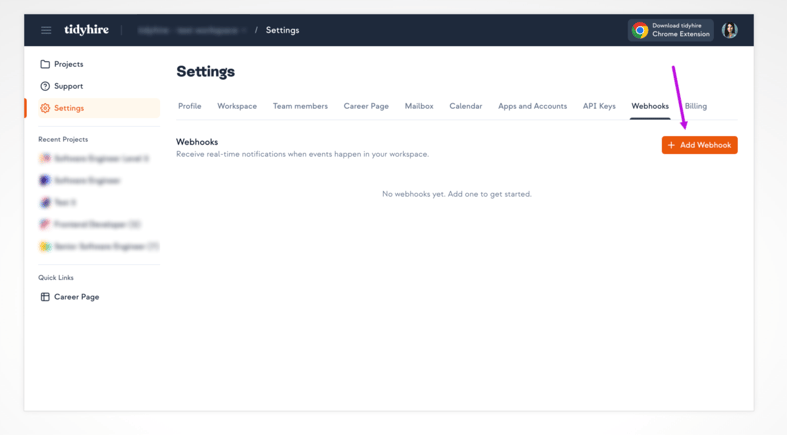
- Navigate to Settings > Webhooks in your Tidyhire Dashboard.
- Click + Add Webhook.
- Enter your Webhook URL — the endpoint that will receive event payloads.
- Select the events you want to subscribe to.
- Click Create.
Supported Events
| Event | Description |
|---|
interview.ended | Fired when a candidate completes an interview |
call.ended | Fired when an AI call ends |
You can subscribe to all events by selecting all events when creating your webhook. This way you’ll automatically receive new event types as they are added.
POST request to your webhook URL with a JSON payload:
{
  "event": "<event_name>",
  "data": { ... }
}
| Field | Type | Description |
|---|
event | string | The event name (e.g. interview.ended) |
data | object | Event-specific payload data |
File Attachments
The interview.ended event includes the interview report PDF as a base64-encoded file in the interview.report_file field:
{
  "content": "<base64_encoded_pdf>",
  "content_type": "application/pdf",
  "filename": "report_intv_001.pdf"
}
report_file will be null.
Responding to Webhooks
Your endpoint should return a 2xx status code to acknowledge receipt. If Tidyhire does not receive a successful response, the delivery is considered failed.
Testing Webhooks
You can send a test event to any active webhook from the Tidyhire Dashboard. This sends a sample payload to your URL so you can verify your integration is working correctly before going live.
Best Practices
- Use HTTPS — Always use an HTTPS endpoint to ensure payload data is encrypted in transit.
- Respond quickly — Return a 2xx response as soon as possible. Process the payload asynchronously if needed.
- Verify the payload — Validate incoming data before processing to guard against unexpected payloads.
- Handle duplicates — Design your handler to be idempotent in case the same event is delivered more than once.